
Download Wondershare Dr.Fone – Mac data recovery tool for iOS devices
Wondershare Dr.Fone for Mac is a powerful, all‑in‑one data recovery solution designed specifically for iPhone, iPad, and iPod users who need a reliable way to retrieve lost or corrupted files. Whether you accidentally deleted a cherished photo, lost important text messages, or your device suffered a sudden crash that rendered it unusable, Dr.Fone offers a straightforward, secure method to recover your data directly to your Mac. The software bridges the long‑standing gap between Apple’s tightly controlled ecosystem and the need for flexible file access.
Traditionally, iTunes and Finder only allow a one‑way transfer of media, leaving users stranded when essential data disappears. Dr.Fone changes that narrative by providing a clear, step‑by‑step interface that lets you scan the device, preview recoverable items, and export them safely to your computer for long‑term storage. The tool also supports recovery from iTunes and iCloud backups, giving you multiple avenues to retrieve information even if the physical device is damaged beyond repair.
Its “Fix iOS to Normal” feature adds an extra layer of utility, enabling you to revive devices stuck on the Apple logo, white screen, or recovery mode. While the free trial only previews recoverable files, the full licensed version unlocks unlimited recovery, ensuring you can retrieve everything you need without hidden limits. In an environment where data loss can mean lost memories, critical business contacts, or legal documentation, Dr.Fone for Mac stands out as a trustworthy, user‑friendly solution that respects both privacy and convenience.
Key Features and Benefits
- Comprehensive file type support – photos, videos, contacts, messages, call logs, notes, calendars, and more.
- Three recovery modes: Direct Device Recovery, iTunes Backup Recovery, and iCloud Backup Recovery.
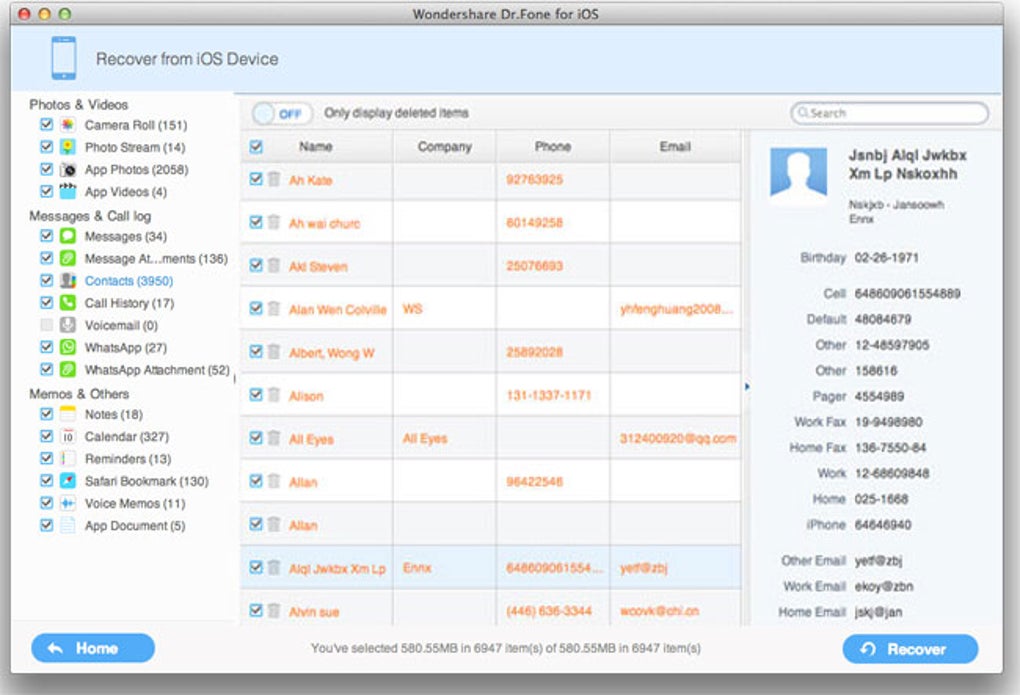
- Live preview of recoverable items before committing to export.
- One‑click “Fix iOS to Normal” for devices stuck in boot loops, recovery mode, or black screen.
- Secure, encrypted connection between your Mac and iOS device via USB.
- Batch export to your Mac with folder organization based on file type.
- Regular updates to support the latest iOS versions and Apple hardware.
- Multi‑language interface for global users.
Pros
- High recovery success rate across a wide range of iOS versions.
- Intuitive UI that requires no technical expertise.
- Backup‑based recovery adds flexibility when the device is physically damaged.
- Secure data handling – no files are uploaded to the cloud without user consent.
- Consistent performance on both Intel‑based and Apple Silicon Macs.
Installation, Compatibility, Cons, and Frequently Asked Questions
Installation & Usage Instructions
Installing Wondershare Dr.Fone on your Mac is a breeze. Begin by visiting the official Wondershare website and clicking the “Download for Mac” button. Once the .dmg file finishes downloading, double‑click it to mount the installer, then drag the Dr.Fone icon into your Applications folder.
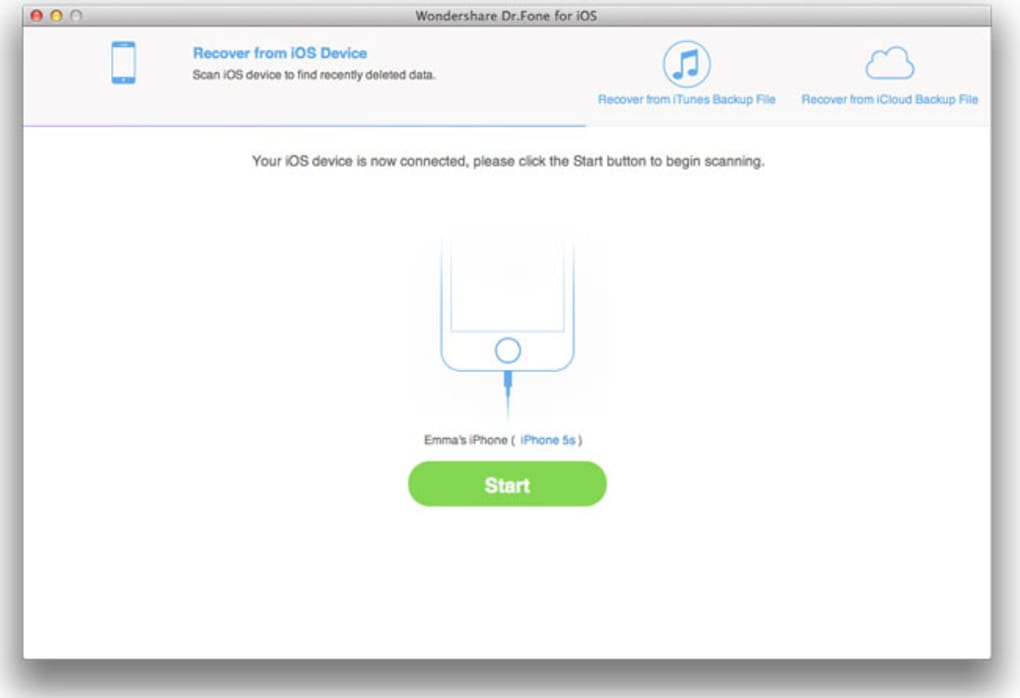
After the copy completes, launch the program. The first time you open Dr.Fone, macOS will ask you to confirm that you trust the developer; click “Open” to proceed. Connect your iPhone, iPad, or iPod to the Mac using an Apple‑certified USB cable.
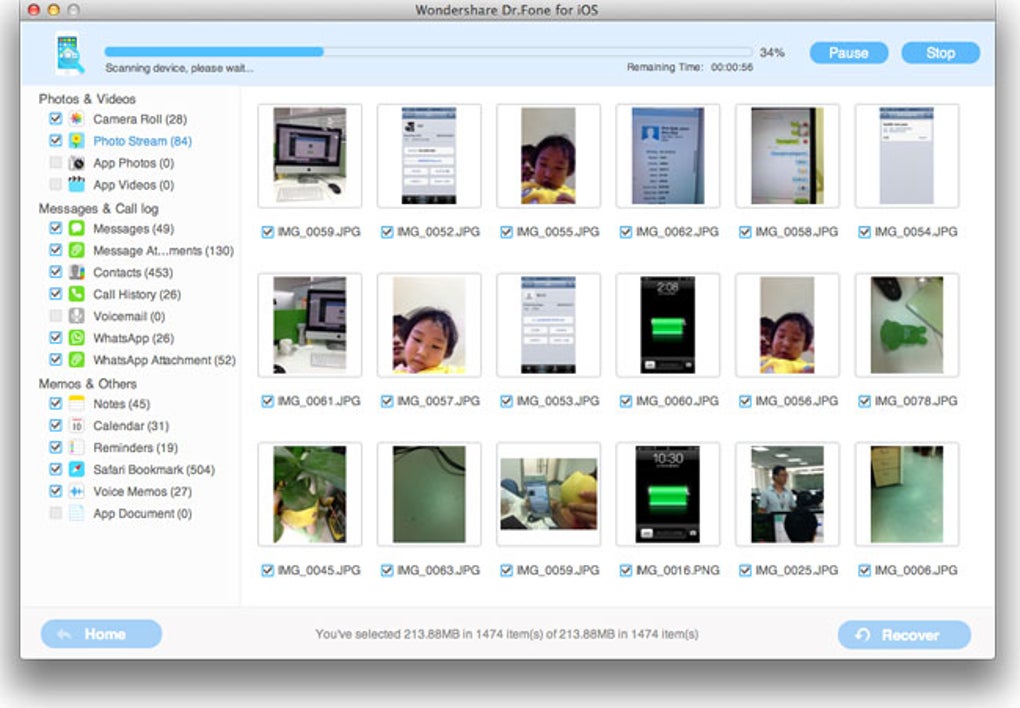
Dr.Fone will automatically detect the device and present you with a dashboard of recovery options. Choose “Recover from iOS Device” for a direct scan, or select “Recover from iTunes Backup” / “Recover from iCloud Backup” if you prefer those routes. Click “Start Scan,” let the software analyze the storage, and then browse the preview list.
Tick the items you wish to restore and click “Recover.” The files will be saved to a location you specify on your Mac, usually within a newly created “Dr.Fone Recovery” folder for easy access.
Compatibility (itemprop="operatingSystem")
Dr.Fone is fully compatible with macOS 10.13 (High Sierra) and later, including macOS 12 (Monterey) and macOS 13 (Ventura). Both Intel‑based Macs and Apple Silicon (M1, M2) models are supported, with native performance on ARM chips. The software works with iOS devices running iOS 7 up to the latest iOS 17 releases, ensuring you can recover data from older iPods as well as the newest iPhone models.
Cons
- The free trial only offers a preview; full recovery requires purchasing a license.
- Large scans on devices with several hundred gigabytes of data can take 30‑45 minutes.
- Occasional false‑positives where the preview shows corrupted files that cannot be fully restored.
- Requires a stable USB connection; unreliable cables may cause scan interruptions.
- Pricing is higher than some basic free utilities, though the feature set justifies the cost.
FAQ (Microdata for FAQPage)
Can Dr.Fone recover data from a device that won’t turn on?
Yes. If the device is completely unresponsive, you can use the iTunes or iCloud backup recovery modes. Dr.Fone will extract data from the most recent backup, allowing you to retrieve photos, messages, and contacts even if the hardware is dead.
Is my personal data safe during the recovery process?
Absolutely. Dr.Fone performs all scans locally on your Mac. No files are uploaded to external servers unless you explicitly choose to use iCloud backup recovery, which uses Apple’s own secure channels.
Do I need iTunes installed to use Dr.Fone?
No. Dr.Fone includes its own driver package that communicates directly with iOS devices. However, having iTunes (or Finder on macOS Catalina and later) installed can help with backup creation and verification.
Can I recover deleted WhatsApp chats?
Yes. Dr.Fone can scan both the device and iTunes/iCloud backups for WhatsApp databases, allowing you to restore individual chats, attachments, and even group conversations.
What is the refund policy if I’m not satisfied?
Wondershare offers a 30‑day money‑back guarantee. If you encounter any issues or are unsatisfied with the recovery results, you can request a full refund within 30 days of purchase.
Conclusion – Why You Should Download Dr.Fone Today
Data loss on iOS devices can be stressful, but with Wondershare Dr.Fone for Mac you gain a reliable, secure, and user‑friendly ally that turns a potentially catastrophic situation into a simple recovery task. The software’s extensive feature set—including direct device scanning, backup‑based recovery, and a dedicated iOS fix tool—covers almost every scenario you might encounter. While the price point reflects its premium capabilities, the peace of mind and time saved are invaluable. If you’ve ever wished you could retrieve that deleted vacation photo, recover an important work email, or rescue contacts after a system crash, Dr.Fone is the answer. Click the download button below, install the app, and experience a hassle‑free recovery process that has helped millions of Apple users worldwide.
Pros: High recovery success, intuitive UI, multiple recovery modes, secure local processing.
Cons: Full version required for actual recovery, longer scan times on large devices.